

We created articles that cover most topics folks ask about, but we still get a few great questions that need short answers. Hopefully, we have many of your remaining questions covered below.
How do I create an account so I can make a purchase?
Buying the course creates the account automatically. You don't need to have an account before purchasing a course or subscription.
I just purchased a course and can't get logged in.
We use a hosting platform for our student's access to the courses. Sometimes the connections between the platforms (payment, course hosting, and integration tools) can get delayed or lost. Please go to www.devforge.com and use the Log In option and verify that you are using the email address used for the purchase. You may need to register that email on the site to enable some new features coming soon.
If those don't resolve the issues, please reach out to help@devforge.com.
Where can I get help when I have questions or problems with course materials?
Students who purchase courses or the DevPass on www.devforge.com get free access to forums.iamtimcorey.com! The forum features class-specific categories, so you are placed with other students from your specific course(s). The goal is to get the community to interact more so everyone can help each other. This will help you build your network of peers that you can contact when you encounter issues in the course or on the job.
For those who are not able to purchase a course or the DevPass, Tim recommends using Stack Overflow. We have a video on how to post a question on Stack Overflow that gets answers.
What course do I take now?
We suggest you start with Start Here. We are working on tools to assist in crafting a custom learning Path but that is still a ways off. Hang in there.
Why can't I purchase a course or a Pass?
Our site uses a pop-up-based purchase window to manage payments. This applies to all courses and the DevPass.
Sample:
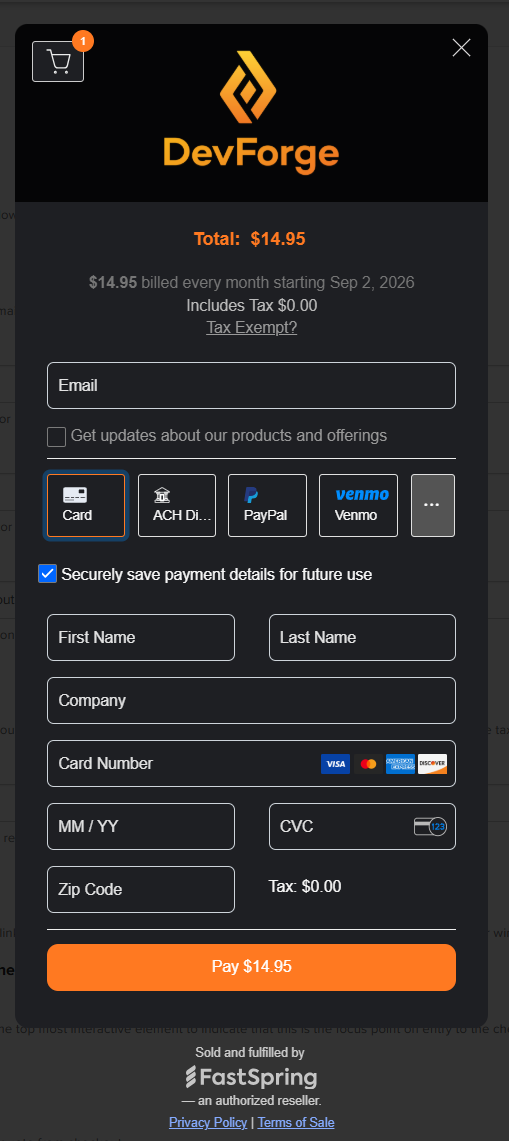
If the pop-up does not appear, it could mean you have a pop-up blocker turned on. In this case, you can try:
use Incognito/ In Private mode
purchase from your phone
a different browser or device
attempt to turn off the blocker temporarily
Note that the actual payment options will vary by location/country.
If the problem is that the system won't take your payment, please contact your bank or use the FastSpring link at the bottom of the pop-up to get additional information on why the payment was not accepted.
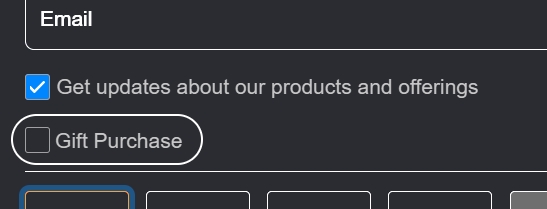
How can I purchase a course for someone else as a gift?
Use the Gift option on the purchase pop-up.
When do the courses on your website start and finish?
The course starts whenever you are ready! It is a completely self-paced online course. You decide when you start and when you finish.
Will the courses work with a Mac?
Many of our students use Macs or Linux, but the vast majority use a Windows platform. Tim's training is created using a Windows based editor. It's up to Mac and Linux users to translate the editor commands to their editor/platform. The Student Forum is a good place for users to help each other with issues related to this.
Where do I download the source code?
Generally, lessons that provide source code will place a downloadable .zip file just above the video. Not all lessons will have source code, depending on the topics covered in that lesson. A few courses have the source code for the entire section downloadable from the Introduction lesson for each section.
How do I change the name on my Certificate of Completion?
The name on the certificates is the name of the account owner. You can change the account's owner name to affect FUTURE course completions and badges. Here is how - Edit Profile
To change Existing Badges and certificates, please contact help@devforge.com. Provide the name and email on the existing badge/certificate, the change needed, and an explanation on why the change is needed. To protect the credentials and integrity of the badges, the ability to make changes to badges is only entrusted to the issuer.
Do your lesson videos have Chromecast support?
Yes, well, sort of. They are standard MP4 files, so no unique controls are needed. Use the internet to search for how to cast your browser tab. For example, in Chrome, you use the ellipse in the upper right corner of the browser and select Cast... You may have to specify 'Cast Tab,' but it works. For MS Edge, you hit Alt+F, select More Tools, and then Cast Media. It duplicates your browser Tab to the selected TV/Monitor so you can watch the lesson. Note that this does not work well with Airplay.
How do I make my purchase tax-exempt?
At the time of purchase, there is a link near the top of the purchase pop-up that is labeled 'Tax Exempt?'. Click it to enter the tax-exempt attestation information. You, as the purchaser, are required to provide the proper validating tax-exemption documentation to any government audits.
Do you offer consulting services? Custom training? Can I hire you?
Tim is currently not personally engaging in consulting services or custom training sessions. We have resources to recommend if you need help developing a project. Please see the Free Resources page of our site.
Copyright information
All courses and works provided and produced by IAmTimCorey and/or DevForge are Copy Right protected. No lesson, video, software or other content contained in our courses may be shared, reused, replicated, distributed, or presented as your own material.
Posting course projects or practice exercise code to your portfolio is not allowed. You may post to your portfolio projects or practice exercises, based on course materials, where you have made significate enhancements and/or customizations that demonstrate your unique efforts and skills. You must call out and direct viewers to that code as part of the posting.
Not finding what you need?
Please use the search box at the top of the page to search our entire knowledge base. Articles address topics like:
Tools to search courses or Tim's YouTube videos by Keyword or topic
How to manage your subscription
Assistance in asking your boss to pay for your training
Trouble shooting video or access issues
More free training
Contact information
You can reach us at help@devforge.com.